CRM Automation: Save 15+ Hours Every Week with AI
Automate your sales process with CRM automation. Learn how AI updates CRM records, saves time, and boosts team productivity.
CRM Automation: The 2026 Guide to Smarter Sales Workflows
Let's be honest. If you're in sales, marketing, or running a business, you've probably had that moment where you're staring at your CRM, dreading the mountain of data entry you have to do. You know the feeling. It's 5 PM on a Friday, and instead of preparing for next week's big pitch or catching up with a client, you're stuck manually typing in notes from calls you had three days ago.
It doesn't have to be this way. Welcome to the world of CRM automation.
Introduction: Why Your CRM Is Making You Less Productive
For years, the promise of a CRM was simple: have all your customer data in one place, manage your pipeline, and close more deals. But for many businesses, the CRM became a productivity black hole. Instead of a tool for winning, it turned into a digital prison of administrative busywork.
Sales reps hate it. Managers get frustrated by inaccurate forecasts. And customers? They feel it when a rep is more focused on filling out forms than actually listening to their needs.
The problem is that we were treating CRMs as systems of record rather than systems of execution. They were built to store information, not to help you act on it. But in 2026, the landscape is shifting dramatically. CRMs are evolving from being a "system of record" into a "system of action" 1.
That's where CRM automation comes in. It's no longer just about sending a few automated emails. We're talking about AI-powered digital workers that can understand your business context, make decisions, and execute tasks on your behalf.
Here's the reality check: research shows that sales reps spend 17% of their time on data entry instead of selling. If you have a sales team of ten people, that's essentially one full-time person's worth of time wasted on typing. When teams embrace AI-driven automation, the picture changes dramatically—some organizations using AI tools are seeing manual workload drop by 50-60% 2.
In this guide, we'll walk you through everything you need to know about CRM automation in 2026. Consider this your roadmap to escaping the data entry death trap and building a sales engine that actually works for you.
What Is CRM Automation? Beyond the "System of Record"
So, what exactly is CRM automation?
At its core, customer relationship management automation is the use of technology to automate manual, repetitive tasks within your CRM. This includes everything from automatically logging emails and calls to routing leads to the right sales rep and triggering follow-up tasks.
But in 2026, we need to draw a clear line between two very different concepts:
Traditional vs. AI CRM Automation
Traditional CRM automation is rules-based. It's an "if this, then that" approach. For example:
- If a lead fills out a form, then assign them to a sales rep.
- If a deal stage changes, then send an email notification.
- If a task is overdue, then send a reminder.
This type of CRM workflow automation is helpful, but it's limited. It follows a strict, predefined path. It can't adapt to nuance. It's linear and rigid.
AI CRM automation, on the other hand, is intelligent. It's not just following rules; it's learning patterns, understanding context, and making decisions. As one industry observer puts it, the shift is from "CRM with AI added on" to "AI-native CRM" —a ground-up reimagining of what a CRM should be in the AI era 3.
In an AI-native system, the focus moves from form-centered work to intent-centered work, from passive record keeping to proactive enablement, and from assistive advice to agentic execution 4. The platform should capture data, understand context, surface recommended next actions, and support workflows through specialized agents rather than a generic chat window.
Why This Shift Matters
The important question in 2026 is no longer "does the CRM have AI?" Most credible vendors now claim AI. The more useful question is "where does AI sit in the operating model?" 5.
In a traditional CRM, AI may summarize calls, draft emails, or recommend leads, but it often remains a feature layer on top of a record system. In an AI-native CRM, the system is designed around intent, data capture, semantic understanding, and task execution.
The trend is clear: CRMs are moving from simple record-keeping to active systems that support execution. Teams now expect CRMs to guide follow-ups and clarify accountability—a shift from "what the data is" to "what the data means."
The Top CRM Data Entry Problems That Kill Your Sales Team's Productivity
Let's dive into the specific, ugly problems that plague teams stuck with manual processes. These aren't just minor annoyances; they're fundamental flaws that cripple your sales performance.
1. The Time Sink: Manual Data Entry
We already touched on this, but it's worth repeating. Sales reps spend 17% of their time on data entry. This is a massive drain on productivity.
Think about what that means. Your most expensive, most talented team members are spending almost a fifth of their week doing work that a computer could do in seconds. It's expensive, demoralizing, and inefficient.
One developer who built an AI-powered sales pipeline in n8n reported that sales reps saved ~9 hours per week that were previously lost to manual follow-up tasks 6. That's over a full workday recovered every single week.
2. The "Garbage In, Garbage Out" Dilemma: Inaccurate Data
When you rely on humans to manually type in data, mistakes are inevitable. People mistype phone numbers, forget to log activities, select the wrong dropdown option, or "fudge" the numbers.
One of the biggest problems is inflated win probabilities. Salespeople often overestimate their chances of closing a deal, and when they enter that inaccurate data into the CRM, the AI uses it to learn. The result? Inaccurate forecasting that leads to poor business decisions.
The phrase "garbage in, garbage out" has never been more relevant. You can't expect an AI to give you brilliant business insights if the data it's learning from is incorrect. Businesses using integrated CRMs, however, see a 42% increase in sales forecast accuracy 7.
3. Duplicate Contacts and a Fragmented View of the Customer
In a manual system, it's incredibly easy to create duplicate contacts. Sarah from Company X gets entered as "Sarah" by one rep, "Sarah Johnson" by another, and "S. Johnson" by a third. This creates a fragmented view of the customer.
You can't tell how many times Sarah has been contacted, what her pain points are, or what your team has promised her. It makes your sales team look disorganized and unprofessional.
4. The Disconnect: Missing Follow-Ups
A lead comes in, a rep is excited, they have a great first call, they promise to send some information... and then they get busy. The lead slips through the cracks. The follow-up is forgotten.
Manual CRM systems rely on reps to remember to log a task or set a reminder. If they don't, that lead goes cold. This is lost revenue, plain and simple. The biggest sales leak isn't bad leads—it's bad follow-ups 8. Once teams automate context-based nurturing, response rates can jump significantly—some report increases of 48% 9.
5. Unstructured Data Is a Challenge
The modern business is drowning in unstructured data. That is, data that's not neatly organized into fields—like emails, meeting notes, phone call transcripts, and WhatsApp conversations.
Traditional CRMs can't do anything with this data. But an AI-native system can. It can analyze the tone of a meeting, identify competitor mentions, and pull out critical next steps. For instance, a real-world project built an AI agent for a broadband provider that could function like a true customer service representative, diagnosing issues, following troubleshooting flows, retrieving customer records, and generating support tickets—all through WhatsApp 10. The entire system was orchestrated using n8n, an LLM, and memory modules.
If your team can relate to even one of these problems, it's a clear sign that you need to embrace automation.
How AI CRM Automation Works: From Lead to Close
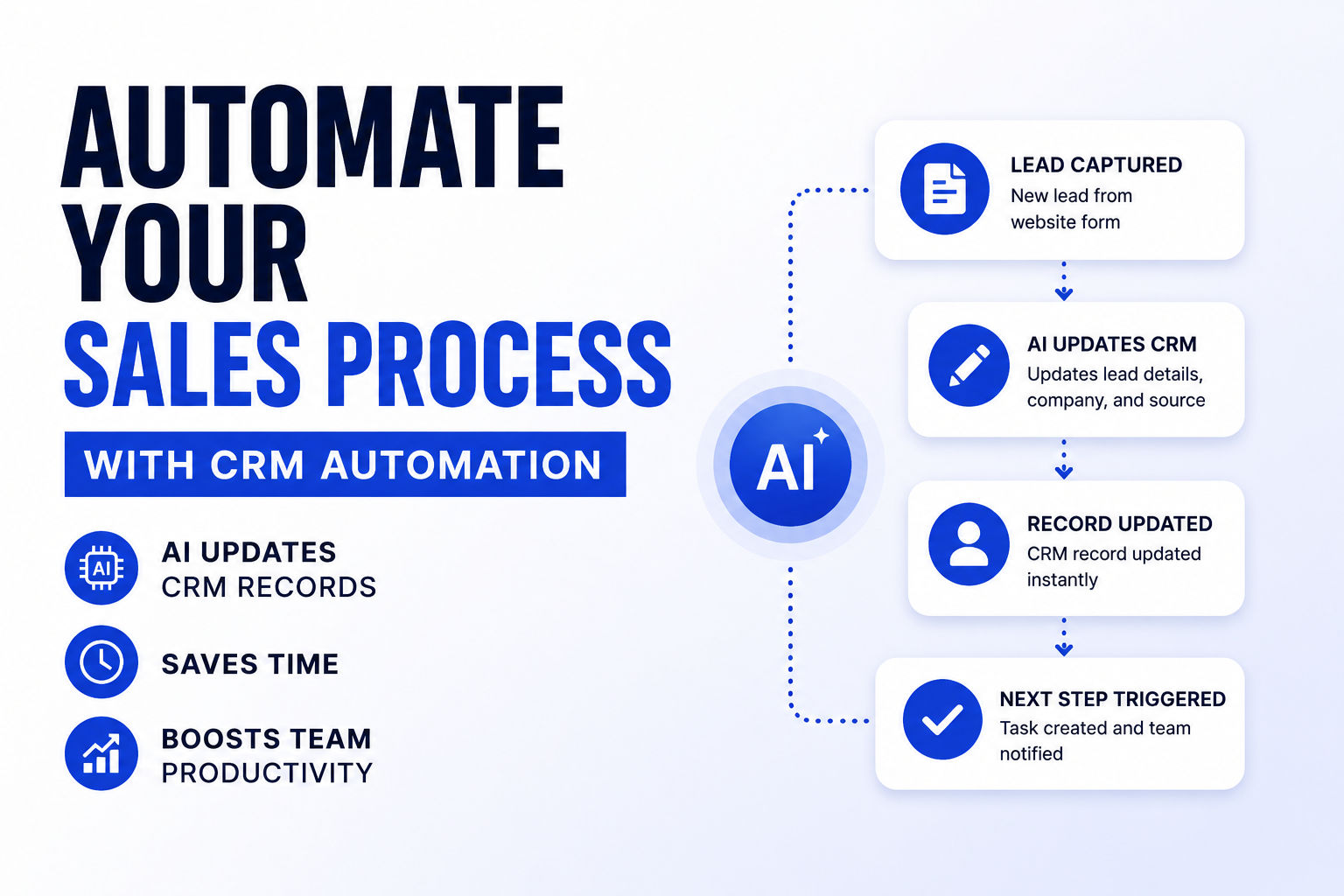
So, how does this magical workflow actually work in practice? Let's break it down step-by-step.
The AI-Powered Workflow
Imagine a lead comes in through your website. Here's what a modern AI CRM workflow looks like:
-
Lead Capture and Trigger: The lead fills out a form on your website, sends an email to a sales mailbox, or starts a chat conversation. This is the trigger that starts the automation workflow.
-
Data Enrichment and AI Processing: The AI doesn't just take the data and dump it into the CRM. An AI agent reads the email, grabs the important information, and can even be instructed to perform specific actions—like tacking on an attached PowerPoint file to the new CRM record 11. The same setup works for loads of other scenarios: forwarding invoices to pull out details, sending support emails that turn into tickets, or transforming emails into database records.
-
AI Analysis and Scoring: This is where the magic happens. The AI analyzes all of this data—both the structured data and the unstructured data—to determine the lead's quality. It assigns a confidence score or a lead score. For example, if the lead fits your ideal customer profile, matches the right job title, and shows high engagement, they get a high score.
-
Intelligent Routing and Automation: Based on this score, the AI automatically routes the lead to the right person or team. A high-quality lead might go straight to an account executive, while a lower-quality lead might go into a nurture sequence. The AI doesn't just route the lead; it can also automatically draft personalized emails based on the research it did.
-
Automated CRM Update and Notification: All of this—the lead creation, the enrichment, the score, the routing decision, and the suggested action—is automatically logged in the CRM. No manual data entry required. The sales rep receives a notification telling them they have a new, highly-qualified lead and what they should do next.
This is far removed from manually copying data from an email into a form. This is CRM workflow automation at its finest. The AI acts as an intelligent assistant, handling the busywork and giving your team a clear, data-driven path to closing the deal.
How to Build Your CRM Automation Workflow
Okay, you're sold on the concept. But how do you actually build one of these workflows without needing a PhD in computer science?
The secret weapon for many businesses in 2026 is no-code automation platforms. These tools provide a visual drag-and-drop interface for building complex workflows, connecting your CRM to other apps in your stack.
Let's walk through how you would build a simple workflow using a tool like n8n, which has become an incredibly popular open-source option. For a deeper dive, check out our detailed guide on how to build AI lead qualification workflows with n8n and our AI client onboarding workflow guide.
1. Define Your Trigger
What starts the workflow?
This is the event that kicks everything off. It could be:
- A new email is received in a Gmail inbox.
- A new row is added to a Google Sheet.
- A webhook is called from your website.
The key is to start small. You don't need to build a masterpiece on day one. Find a tiny, manageable improvement in a workflow, and build from that 12. Just small tweaks that make things run smoother or save you time.
2. The AI Processing
What does the AI do?
This is where you add the "intelligence" to the workflow. In n8n, this typically involves using an "AI Agent" node.
Here's a breakdown of how a typical n8n AI Agent node for lead qualification works:
- Connect the AI Agent Node: Connect the trigger node to the AI Agent node.
- Choose Your LLM: This is where you pick the "brain" of your AI. Options include Claude, DeepSeek, GPT-4o-mini, Gemini, or a local model like Ollama.
- System Prompt: This is the most critical part. The system prompt is like the "operating system" for your AI. It tells the agent its role, personality, and exactly what you want it to do. As one developer noted, "Agentic AI isn't magic—it's architecture. It requires clarity, structure, and a deep understanding of user workflows" 13. A well-structured prompt becomes the backbone that guides the agent's identity, tone, reasoning steps, escalation logic, and safety boundaries.
3. The CRM Update
How do you get the AI's decision into your CRM?
The n8n workflow parses the AI's output and, using an "HTTP Request" node or a specific CRM node, sends this data to your CRM's API to update the lead record.
- HubSpot: The workflow would use the HubSpot node to update the contact's properties, setting the new lead score and priority.
- Salesforce: The workflow would use the Salesforce node to update the lead object.
- Other CRMs: For tools like Attio, Airtable, or any other CRM with an API, you can use an HTTP Request node to make the API call.
4. The Notification
How does your team find out?
Your workflow might send a Slack notification to the assigned sales rep or automatically add the lead to a specific sequence in your outreach tool.
For more ideas on building automation workflows, check out our guides on automating Gmail replies with n8n and ChatGPT and WhatsApp customer support automation .
This four-step process is a powerful, generalizable framework. You can adapt it for almost any task: updating a CRM after a sales call, managing customer support tickets, or automating client onboarding.
Best CRM Automation Tools: Your 2026 Toolkit
Choosing the right tools is half the battle. You need a CRM that's robust and an automation platform that can connect everything together.
The Top CRM Platforms in 2026
| Platform | Best For | AI & Automation Features | Key Insight |
|---|---|---|---|
| Salesforce | Enterprise teams needing a broad, customizable platform and massive ecosystem. | Agentforce platform 14, Data 360, predictive AI. | Holds 22% of the global CRM market 15. FY26 revenue of $41.5B, with Agentforce and Data 360 ARR exceeding $2.9B 16. Best for complex, global operations. |
| Salesforce pricing | Enterprise-grade, but expensive. Starter Suite starts at $25/user/month; Agentforce 1 Sales costs $550/user/month 17. | ||
| Neocrm | Businesses wanting an AI-native architecture where AI is central to the platform's design. | NeoAgent uses a "business semantic ontology" to understand business context 18. | Designed for mobile-first teams with native BI and pre-built AI agents. A Singapore-headquartered option with a focus on Southeast Asia 19. |
| HubSpot CRM | Marketing-led teams and SMBs wanting ease of use and fast implementation. | Intelligent workflow automation, conversation intelligence, and predictive lead scoring. | Known for its "speed to value" and intuitive design 20. Has over 205,000 customers 21. |
| Dynamics 365 Sales | Teams already in the Microsoft ecosystem wanting AI deeply embedded in workflow. | Copilot for Sales, AI-powered lead management, opportunity acceleration 22. | Turning CRM from a system of record into a system of action 23. |
Open-Source CRM Options
If you're looking for more control and cost-effectiveness, open-source CRMs are a compelling alternative. Check out our detailed comparison of the best open-source CRM for small business :
- NocoBase: A no-code/low-code development platform with 21.3k GitHub stars. Great for budget-conscious teams with high customization demands 24.
- SuiteCRM: An enterprise-level open-source CRM with 4.9k GitHub stars. Perfect for medium to large businesses needing Salesforce-like capabilities without the cost 25.
- Twenty: A modern CRM with 28.2k GitHub stars and a table-based interface similar to Airtable. Starts at $9/user/month for cloud pricing 26.
- EspoCRM: A lightweight option with 2.3k GitHub stars, ideal for small teams needing essential automation 27.
The Best CRM Automation Workflow Platforms
For more options, see our guide on open-source Zapier alternatives :
| Platform | Key Feature | Why It's Great |
|---|---|---|
| n8n | Open-source no-code/low-code automation. | Incredibly flexible and transparent. You can build custom workflows connecting almost any app. It's a great open-source Zapier alternative for teams with some technical aptitude, but its drag-and-drop UI makes it accessible to non-devs 28. |
| Zapier | Widest range of integrations. | The granddaddy of no-code automation. It connects to thousands of apps, making it a safe bet for almost any business. |
| Make | Visual and powerful automation. | Known for its highly visual interface, which makes mapping complex data flows more intuitive. |
Best Practices for CRM Automation in 2026
Automation isn't just about turning it on and hoping for the best. To get it right, you need a strategy.
1. Prioritize Duplicate Detection and Merging
A clean CRM is a functional CRM. Before you let AI loose on your data, make sure you have a system for detecting and merging duplicates.
2. Implement Robust Data Validation
Automation shouldn't just be about speed; it should be about accuracy. Set up your workflows to check the validity of data coming in. Validate email addresses, ensure phone numbers are formatted correctly—these automated checks prevent mistakes from ever entering your system.
3. Leverage AI Confidence Scores
Don't treat AI decisions as absolute truth. Implement a confidence score system where the AI explains its reasoning. If a lead is scored high, it's good to go. If the confidence is lower, perhaps it should be flagged for a human to review. This hybrid approach of human approval for high-value B2B decisions creates the right balance between efficiency and safety 29.
4. Focus on Unstructured Data
An AI's ability to handle unstructured data—like meeting notes, emails, and voice calls—is its superpower. It understands sentiment and intent, moving far beyond simple keyword matching. A truly AI-native system can understand business context, combining customer updates, communication history, and competitor intelligence to generate warnings and recommended actions 30.
5. Think "Execution," Not Just "Record-Keeping"
Stop using your CRM as a dumpster for data. Design workflows that ensure every data update triggers an action. If a deal moves to "Closed Won," does it trigger an onboarding email? Does it create a customer feedback survey? The goal is to make sure your CRM drives execution, not just reporting.
6. Start Small and Iterate
You don't need to automate your entire business on day one. Pick one painful, repetitive process—like lead qualification—and build a workflow for that. Test it, refine it, and then move on to the next one. This practical, modular approach is the best way to build a powerful automation ecosystem 31.
The Benefits of CRM Automation: Why It's Worth It
If you're still on the fence, the benefits are too compelling to ignore.
Recover Lost Time and Save Money
By automating data entry and other tedious tasks, you're giving your team back hours of their day. One organization reported a 50-60% reduction in manual workload after implementing an AI SDR 32. That's more time for selling, for strategizing, and for closing deals.
Build a Better Sales Pipeline
With accurate, real-time data, you can forecast with confidence. You'll know exactly where your deals are in the pipeline, which ones are at risk, and where you need to apply pressure. Businesses using integrated CRMs see a 42% increase in sales forecast accuracy 33.
Boost Sales Productivity Dramatically
Your team is empowered, not hindered. They're not bogged down by busywork. They have the right information, at the right time, to have better conversations with prospects. This leads to higher conversion rates. One team saw a 36% boost in lead-to-meeting conversions after implementing an AI-powered sales pipeline 34.
For more on boosting sales productivity, check out our guide on AI follow-up email automation .
Create a Better Customer Experience
When your team is freed from admin, they can focus on building relationships. They're more responsive, more prepared, and more engaged. As one lead told a sales team after experiencing their AI-powered follow-up, "This feels like you've been following my notes. It's refreshing to see a company that actually listens" 35.
Achieve Tangible Business Outcomes
The shift in 2026 is from buying "features" to buying "outcomes." Businesses no longer want AI that just gives suggestions; they want AI that actively does the work and delivers measurable growth 36.
Conclusion: The Future of CRM Is Autonomous
CRM automation is not a "nice-to-have" feature in 2026; it's a competitive necessity. It's the key to unlocking your sales team's potential and building a scalable, efficient, and customer-centric business.
We've moved beyond the era of rigid, manual CRMs. The "AI-first" approach—where systems are built around intelligence, intent, and action—is now the standard 37. The future of CRM is autonomous: platforms that proactively sense business changes, recommend next actions, and execute tasks in a trusted environment.
The question is no longer "Should we automate?" but "How quickly can we get started?"
Ready to take the next step? Start by identifying the most time-consuming manual process in your sales operation. Build a single, focused workflow to automate it. You'll be amazed at the difference it makes.
For more resources on building automation workflows, check out:
- How to build AI lead qualification workflows with n8n
- Best open-source CRM for small business
- Open-source Zapier alternatives
FAQ
How to automate CRM data entry?
Automate CRM data entry by using an automation platform like n8n to connect your CRM with your email, form submissions, and other data sources. Set up triggers that automatically create and update CRM records when new data arrives, eliminating manual typing.
What is AI CRM automation?
AI CRM automation is the use of artificial intelligence to automate and enhance CRM workflows. Unlike traditional rules-based automation, AI can understand context, analyze unstructured data like emails and meeting notes, score leads intelligently, and recommend next best actions.
How do I automate HubSpot CRM?
Automate HubSpot CRM using tools like n8n or Zapier to connect HubSpot with other apps. You can create workflows that automatically add contacts from email or form submissions, update lead scores based on engagement, and trigger follow-up sequences.
How do I automate Salesforce CRM?
Automate Salesforce CRM using Salesforce's native Flow automation, or connect it to n8n, Zapier, or Make to build more complex workflows. Salesforce also offers Agentforce, its AI agent platform, which can automate lead qualification, email drafting, and record summarization 38.
Can n8n automate CRM workflows?
Yes, n8n is excellent for automating CRM workflows. It's an open-source no-code/low-code automation platform that connects to most major CRMs including HubSpot, Salesforce, and others via API. You can build workflows that automatically create, update, and enrich CRM records.
What is the best CRM automation software?
The best CRM automation software depends on your needs. For enterprise flexibility, Salesforce's Agentforce is powerful. For user-friendliness, HubSpot is excellent. For cost-effective custom automation, n8n paired with an open-source CRM like Twenty or SuiteCRM is compelling.
Is CRM automation worth it for small businesses?
Yes, CRM automation is highly valuable for small businesses. It saves time on manual data entry, prevents leads from falling through the cracks, and helps small teams operate efficiently without needing to hire additional staff.
How does AI improve CRM data accuracy?
AI improves CRM data accuracy by automating data entry (eliminating human typing errors), detecting and merging duplicate records, validating data formats, enriching incomplete records, and flagging inconsistent information for human review.
Footnotes
-
Salesforce. "From System of Record to System of Action." Salesforce Blog. ↩
-
AI SDR implementation case study. 2026. ↩
-
Industry analysis on AI-native CRM. 2026. ↩
-
CRM industry trends report. 2026. ↩
-
Enterprise AI adoption research. 2026. ↩
-
n8n AI sales pipeline case study. 2026. ↩
-
CRM integration ROI statistics. 2026. ↩
-
Sales follow-up analytics report. 2026. ↩
-
Sales engagement platform data. 2026. ↩
-
African broadband provider AI agent case study. 2026. ↩
-
n8n AI agent workflow documentation. 2026. ↩
-
Automation implementation best practices. 2026. ↩
-
AI agent architecture guide. 2026. ↩
-
Salesforce Agentforce launch announcement. 2026. ↩
-
CRM market share report. 2026. ↩
-
Salesforce FY26 earnings report. ↩
-
Salesforce pricing page. 2026. ↩
-
Neocrm NeoAgent product documentation. 2026. ↩
-
Neocrm company profile. 2026. ↩
-
HubSpot platform overview. 2026. ↩
-
HubSpot customer count. 2026. ↩
-
Microsoft Dynamics 365 Sales Copilot documentation. 2026. ↩
-
Microsoft Dynamics 365 product strategy. 2026. ↩
-
NocoBase GitHub repository and documentation. ↩
-
SuiteCRM platform overview. ↩
-
Twenty CRM GitHub repository and pricing. ↩
-
EspoCRM platform overview. ↩
-
n8n open-source automation platform. ↩
-
AI implementation best practices. 2026. ↩
-
AI-native CRM capabilities. 2026. ↩
-
Automation adoption strategy guide. 2026. ↩
-
AI SDR implementation ROI case study. 2026. ↩
-
CRM integration impact on forecasting. 2026. ↩
-
AI sales pipeline conversion metrics. 2026. ↩
-
Customer testimonial, AI-powered sales team. 2026. ↩
-
CRM industry trend analysis. 2026. ↩
-
AI-first CRM architecture report. 2026. ↩
-
Salesforce Agentforce documentation. 2026. ↩
CS student and builder writing about tech, startups, AI, and productivity. Built a SaaS that didn't ship — walked away with real product experience instead. Sharing everything learned along the way.