AI Follow-Up Email Automation
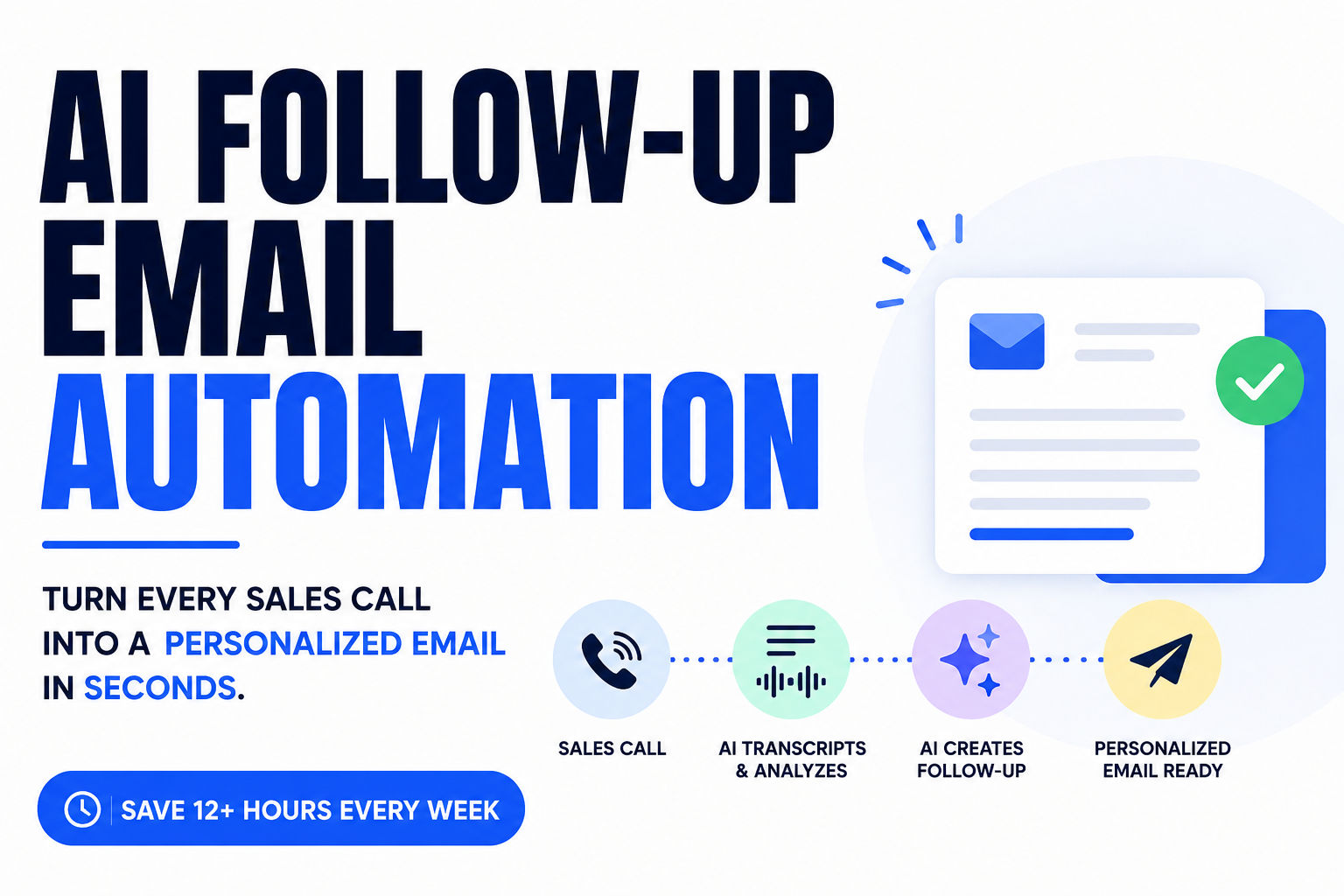
80% of sales need 5+ follow-ups, yet reps quit after 4. Learn how AI automation drafts personalized emails in 30 seconds. 12 hrs/week saved. ROI in 90 days.
Let me tell you about Sarah.
Sarah's a solid sales rep. She knows her product inside and out. She's got genuine relationships with her clients. And every single week, she spends roughly 15 hours writing follow-up emails—emails that mostly get ignored.
She finishes a discovery call with a prospect (let's call them TechCorp). The prospect mentioned three specific pain points, dropped hints about their budget timeline, and said "let's talk next week." Sarah knows she should follow up today. She knows follow-ups are where deals actually close. But instead of sending something thoughtful within the next hour, she's stuck in back-to-back meetings.
By the time she gets to her email, it's been six hours. She's half-remembered the call details. She drafts something generic: "Hi there, thanks for the great conversation today. We discussed some solutions that might help with your needs. Let me know if you'd like to chat more."
It gets buried in their inbox. They don't respond. Two weeks later, Sarah follows up again with basically the same email. Still nothing. Then she gives up.
Here's what you need to know: 80% of sales require at least five follow-up touches, yet 92% of reps quit after four attempts. Sarah isn't lazy. She's not bad at sales. She's just drowning in the administrative side of selling.
This is where AI follow-up automation comes in. But I'm not talking about those cheesy automated sequences that sound like a robot drafted them in 2003. I'm talking about something completely different.
What Is AI Follow-Up Email Automation (And Why It's Definitely Not Templates)
Imagine this: Sarah's discovery call with TechCorp ends at 2 PM. The call is automatically recorded. By 2:03 PM, she gets a notification: "Your follow-up is ready to review."
She clicks. The AI has generated an email that references all three pain points they discussed. It mentions their timeline. It references the specific software tool they said wasn't working for them. And it actually sounds like Sarah—conversational, direct, no corporate buzzwords.
The whole thing took the AI about 30 seconds to create. Sarah spends two minutes adding one personal line ("I had a similar situation at my last company, so I really get the integration challenge you're facing"). She hits send.
The prospect reads it that night and thinks: "Wow, they actually listened to me. They're not just pitching—they understood what I said."
That's the difference between AI email automation and templates.
AI follow-up automation is not:
- A canned template with [First Name] inserted
- A sequence that sends the same message to everyone
- Something that sounds robotic
- A replacement for actual salespeople
AI follow-up automation IS:
- A system that listens to your actual calls
- Understands the specific context of your conversation
- Drafts personalized emails in seconds
- Preserves your voice and style
- Handles the writing so you can focus on strategy
Here's the actual workflow:
Your call ends → AI captures the recording → System transcribes it in real-time → AI analyzes what was actually discussed (pain points, objections, timeline, budget signals) → Email draft gets created in your voice → You spend 2 minutes reviewing and personalizing → Email sends at optimal time → Prospect receives something that actually feels personal, not automated.
It's the difference between spending 15 minutes drafting an email and spending 2 minutes reviewing one. Multiply that by 10-15 calls per week, and you're suddenly getting 2 hours of your life back every single week. Which doesn't sound dramatic until you realize that's 100+ hours per year.
Why This Matters: The Real Cost of Manual Follow-Ups (And Why Your Competitors Aren't Falling Behind Accidentally)
Let's be honest about what sales actually looks like in 2026.
You wake up, check Slack, there's already three Zooms on your calendar. You finish the first call at 10 AM—it was good. The prospect seemed interested. You meant to send a follow-up immediately, but boom, next call starts in three minutes. Now you're in back-to-back meetings until 4 PM.
You finally get some breathing room, and you're exhausted. Your brain is fried from four hours of talking. But you've got five calls to follow up on. So you sit down and try to remember what each person said.
Call one? You've got notes, but you're already forgetting the exact concern they mentioned about integration. Call two? Was that the company with the 15-person team or the 50-person team? You take a guess and draft something generic. Call three? You literally can't remember if they said they had budget approved or still needed board sign-off.
By call five, you've spent 90 minutes writing emails that could've been sent in the first hour after each call. And they still sound half-hearted because you're working from 40% memory.
So you send them anyway. Most don't get responses. You tell yourself you'll follow up next week. But next week brings ten more calls. And at some point, follow-ups feel like an impossible task.
This is why the numbers are so harsh:
80% of sales require five or more follow-up contacts after the first interaction (LeadResponse Research), yet 44% of salespeople give up after a single follow-up attempt (HubSpot). That's not a motivation problem. That's not a skill problem. That's a time problem.
Think about it: 95% of converted leads are reached on the 6th call attempt, yet only 10% of reps make more than three (Outreach/ZoomInfo Research). The data is screaming at us. But most reps will never see it because they're too busy drowning.
Here's the brutal part: Sales teams with a standardized follow-up process see 78% higher conversion rates than those without one (HubSpot). That's not a 10% difference. That's not "nice to have." That's the difference between closing deals and losing them.
And here's where AI actually changes the game. Sales teams using automation save an average of 12 hours every week (Nebor/Gartner Research). That's not some vendor claim. That's real time. That's nearly a full workday per week you're getting back.
For Sarah, that means instead of spending 3 hours on follow-up emails, she spends maybe 30 minutes reviewing AI drafts and personalizing them. The rest of the time? She's on the phone with prospects. She's actually selling.
Twelve hours per week is 624 hours per year. That's 78 full working days per rep that could be redirected to revenue-generating work instead of email drafting.
Time is the constraint in sales. Always has been. Always will be.
How AI Follow-Up Automation Actually Works (And Why the Details Matter)
Let me walk you through an actual scenario so you can see how this plays out in the real world.
Step 1: The Call Happens (And Recording Just... Happens)
Sarah's on a Zoom call with TechCorp. It's 2 PM on a Tuesday. She doesn't have to do anything special. The call is being recorded automatically—Zoom is already set to record by default.
TechCorp's procurement lead talks through their pain: their current software doesn't talk to Salesforce, they're losing data in spreadsheets, and they need something that integrates by Q3. They mention they've already got $200K allocated. They also throw out that they're nervous about implementation disrupting operations. Sarah takes notes, asks good questions, and they agree to reconnect after TechCorp loops in their IT team.
The call ends at 2:28 PM. Sarah's got three more calls this afternoon.
Step 2: Speech-to-Text Captures Everything (Even What Sarah Forgot)
The moment the call ends, the recording starts uploading. Within 60-90 seconds (depending on the tool), the system has transcribed the entire 28-minute conversation into text.
Here's the thing most reps don't realize: the transcript captures everything Sarah said, everything the prospect said, and all the details she half-jotted down. Not just the words—the context. The tone. The priorities.
The AI now has a complete record of the call. Sarah's already moved on to her next meeting, but the system is just getting started.
Step 3: AI Reads the Transcript and Actually Understands It
This is where it gets interesting. The AI doesn't just scan for keywords. It understands what happened in the call. It identifies:
- Specific pain points ("Their current tool doesn't integrate with Salesforce, causing data loss in spreadsheets")
- Budget signals ("Already allocated $200K for Q3")
- Concerns and objections ("Nervous about implementation disrupting operations")
- The actual decision-maker structure ("Need to loop in IT team before moving forward")
- Real timeline ("Need solution live by end of Q3")
- What was promised ("Sarah said she'd send case study on implementation without downtime")
All of this happened in a natural conversation. The prospect didn't say "here are my pain points in bullet form." They just... talked about their business. The AI extracted the meaning from that real conversation.
This is completely different from how basic email automation works. Basic systems ask you to fill in a form: "What's their main objection?" You guess from memory. AI systems that understand conversations don't need you to remember anything—they listened.
Step 4: Email Draft Gets Written (In Sarah's Voice, Not a Template)
By 2:35 PM, Sarah gets a notification: "Your follow-up for TechCorp is ready."
She clicks to see what the AI drafted:
Hi [Name],
Thanks for taking the time to walk through your current stack today. I really got a sense of the data loss issue you're dealing with—moving spreadsheet data back and forth just doesn't scale, especially when you're trying to keep everything in Salesforce.
A couple things stuck with me from our conversation. First, the Q3 timeline makes total sense—you want this live before the fiscal push kicks in. Second, I know implementation disruption is a real concern. I've got a case study from a company in financial services that managed a full implementation over a single weekend with zero downtime. I'll send that over today.
One thing that might help: once you've looped in your IT team, we could do a quick architecture review call to walk through exactly how the integration would work without impacting your operations. No obligation, just so they can see it's actually pretty straightforward.
Let me know when they're available. Looking forward to showing you how this solves the Salesforce integration issue.
Talk soon, Sarah
Sarah reads this and thinks: "That's... actually really good. It's me. It sounds like me. It references all the stuff they actually cared about. And it moves the deal forward without being pushy."
The AI didn't just fill in a template. It understood Sarah's style (direct, casual, no corporate speak), understood the prospect's concerns (implementation disruption, IT team buy-in), and created something that actually addresses what matters.
Step 5: Sarah Adds One Personal Touch (Two Minutes, Maximum)
Sarah makes two small changes:
- She adds a line referencing something personal the prospect mentioned (they'd worked at her company 15 years ago)
- She adds a specific date for when she'll send the case study ("by end of day today")
Total time spent: 90 seconds of actual work.
The draft was already 90% there. Sarah just made sure it felt like Sarah, not like a robot wearing Sarah's face.
Step 6: Strategic Timing (Not Just "Send Now")
Sarah doesn't hit "send immediately." She knows from experience that TechCorp's procurement team checks email around 5 PM (end of workday wrap-up). She sets the send for 4:55 PM the same day.
Good AI systems learn when this specific prospect is most likely to actually read email. Not generic "Tuesday at 10 AM" stuff. Real data about when TechCorp's team opens emails, engages with links, and replies.
The email arrives when they're actually paying attention. Not buried in an inbox full of morning noise.
So what just happened? Sarah took one call. She did zero follow-up work. And she's got a thoughtful, personalized, well-timed email sitting in TechCorp's inbox 2.5 hours after the call ended—when they're actually ready to read it. Not because Sarah is superhuman. Because the AI handled the heavy lifting.
Why Sales Teams Are Actually Adopting This (The ROI Is Real—And You Can Calculate Yours)
Here's what I want to be clear about: I'm not going to throw vendor stats at you and pretend they apply to your business. Instead, let me walk through what actually happens when a team implements this, in terms you can relate to.
The Time Savings (And What It Actually Means)
Sales teams using automation save an average of 12 hours every week (Nebor/Gartner Research). Let me break down what that looks like in practice.
Sarah used to spend about 3 hours per week writing follow-up emails. Now she spends about 30 minutes reviewing AI drafts. That's a 2.5-hour swing just on follow-ups.
Then there's the other stuff: she's not copying information from calls into Salesforce manually anymore. Her CRM is automatically populated with what was discussed. That's another hour gone. She's not manually scheduling follow-up reminders. That's gone too.
Total? Sarah's got about 12 hours back per week. Some weeks it's 10, some weeks it's 14. But the median is right around 12.
Now here's where most people miss the actual value. Twelve hours sounds nice. But what actually happens to those twelve hours determines whether this is a nice-to-have or a game-changer.
If those 12 hours get absorbed into more meetings and more admin work, nothing changes. Sarah just feels less stressed for a week and then the new admin work fills the void.
But if Sarah redirects those 12 hours into actual selling? Everything changes.
Let's do the math. Sarah closes about 4 deals per month at an average deal size of $50K. That's $200K per month in revenue. At a 20% close rate (pretty standard for B2B), she's actually talking to about 20 qualified prospects per month.
With 12 extra hours per week, she can now:
- Follow up more consistently (hitting that 5-6 touch mark instead of giving up at 2)
- Follow up faster (same-day follow-up instead of three days later)
- Actually think about account strategy instead of just trying to keep up
Conservative estimate? She closes one additional deal per month just from better follow-up discipline. That's $50K in extra revenue per month. That's $600K per year.
Her follow-up automation tool costs maybe $300-500 per month in software. So the payback period is literally one extra deal.
Close Rate Impact (The Thing Nobody Talks About)
Here's what's interesting: Sales teams that implement automation report 27% higher close rates (This+That Research).
That 27% number gets thrown around, but it deserves unpacking. A 27% higher close rate doesn't mean every rep goes from 20% to 47%. It means that across a team, the average improves by about 27%.
Why? Because Sales teams that implement automation report 27% higher close rates (This+That Research), but more importantly, the deals that would've been lost to procrastination (Sarah's problem) don't get lost anymore.
Think about Sarah's TechCorp deal. Without automation, the email goes out three days later, sounds generic, gets buried, gets one mediocre follow-up next week, and eventually dies. With automation, the email goes out same day, sounds personalized, references their real concerns, and creates momentum.
You're not magically getting better at sales. You're just removing the self-inflicted wounds.
Deal Size (And Why It Goes Up)
Organizations using advanced automation see a 30% increase in deal size (This+That Research).
This one seems random until you think about it. When reps have more time and mental energy, they don't just close more deals—they work bigger deals. They actually explore expansion opportunities. They think about the client's full ecosystem instead of just trying to close the initial sale.
Sarah spends an extra hour with a prospect exploring their full pain, instead of closing at the minimum viable scope just to hit quota. Boom. Deal size goes from $40K to $52K.
The Real ROI (Without The Vendor Bullshit)
Companies achieve $5.44 return for every $1 spent on automation, with 76% seeing positive ROI within the first year (This+That Research).
That $5.44 number is real, but it assumes you're actually reinvesting the time and optimizing the workflow. It's not automatic. You have to actually do something with the time you get back.
But here's the thing: Companies that implement comprehensive automation can achieve 10–20% revenue growth within 6–9 months of deployment (This+That Research).
For a 10-person team doing $2M per year, 10% growth is $200K in extra revenue. Even at a generous 50% margin, that's $100K in extra profit in the first year. Your software cost? Maybe $5K per year total. Your implementation cost? Maybe another $2K for setup and training.
Payback period: two weeks.
I don't care how good your product is or how great your pitch is—if you can't get basic follow-ups out in a timely, personalized way, you're leaving money on the table. And AI follow-up automation is the leverage point that actually fixes it.
The Top Tools Actually Worth Using (And Why Most Of Them Are Wrong For Your Actual Job)
Here's the thing about the AI email automation market: it's become a bit of a mess.
Every tool claims to do everything. Every platform promises you'll never need another tool. And most of them are lying—either to themselves or to you.
The reality is simpler: there are basically two different types of problems, and they need different tools.
Problem Type 1: Post-Call Automation ("I just talked to them. Now I need to follow up intelligently.")
Problem Type 2: Cold Outbound Sequences ("I'm reaching out to people who haven't talked to me yet. I need volume and messaging cadence.")
Most companies need both. But they need different tools for each job. Trying to use one tool for both is like using a hammer to screw in nails. It'll work eventually, but you're going to look stupid doing it.
For Post-Call Follow-Up (The Conversation-Aware Tier)
Sybill is built specifically for the "I just got off a call with someone interested" problem.
Here's what it does: you finish a call. It records. It transcribes. It analyzes what was actually discussed. It drafts an email that sounds like you and references actual details from the call. You review it (2 minutes), add a personal line if you want, and send.
The email goes into Salesforce or HubSpot with full context about what was discussed, what the next steps are, and what objections came up. Your deal record is automatically populated. Your manager can see what happened in the call without asking you. Your follow-up sequence is already smart because it knows what was actually said.
What Sybill is NOT good for: cold outbound sequences. If you're reaching out to 100 people who've never heard of you, you need a different tool. Sybill is narrowly focused on the "they talked to us, now we nurture" part of the sales cycle.
Who should use it: Account executives, sales development reps working inbound leads, customer success teams managing renewals. Basically anyone whose job is "they're already talking to us, now close them."
For Multichannel Sequences (Email + LinkedIn + SMS)
Reply.io is built for the opposite problem: you need to reach a lot of people, across multiple channels, with smart sequencing.
You upload a list of prospects. Reply builds sequences that include email, LinkedIn touches, SMS, even phone calls. It has AI that helps personalize at scale. It integrates with HubSpot, Salesforce, and others so everything logs back to your CRM.
What Reply is good for: you're an SDR running outbound. You need to touch 200 prospects per month. You need a sequencer that handles email, LinkedIn, and calls all in one place. You need the AI to help you personalize at scale without losing your mind.
What Reply is NOT good for: if your main job is having calls with interested prospects and following up with them smartly, Reply is clunky. It's built for volume, not precision.
Who should use it: SDRs, outbound-focused AEs, agency growth teams, anyone whose job is "generate pipeline from scratch."
If You're Already All-In on HubSpot
HubSpot Sales Hub includes email sequences and basic AI email assistance built right in.
Look, HubSpot's tool isn't bad. If you're already paying for HubSpot, you might as well use it. It's integrated, it's tight with your CRM, and there's no learning curve.
What HubSpot is good for: if you're a solo founder or small team and you need something that works, not something that's perfect, HubSpot works. You can handle cold sequences, you can automate email sending, you get basic AI help.
What HubSpot is NOT good for: if you're a fast-growing team and you need real conversation intelligence or real multichannel sophistication, HubSpot will feel limited. Most growth teams eventually add a specialized tool on top.
The Honest Take (And Why It Matters)
The strongest stacks in 2026 combine a solid CRM (Salesforce, HubSpot) with a specialized AI layer like Sybill that handles the conversation intelligence, follow-up automation, and CRM population that general platforms simply can't match (Sybill).
Translation: Buy your CRM from HubSpot or Salesforce. Use that as your source of truth. Then add a specialist tool on top that solves your actual problem.
If you're an inbound-focused team drowning in post-call follow-ups, add Sybill.
If you're an outbound-focused team trying to build pipeline from scratch, add Reply or Outreach.
If you're a small team just starting, HubSpot alone is fine for now.
But don't buy one tool and expect it to solve everything. The vendors that claim they do are the ones that end up solving nothing particularly well.
How to Implement This Without Breaking Your Sales Process (Or Losing Your Team)
Here's the thing about automation: most teams buy the tool and immediately try to force everyone to use it on day one. Then it fails because nobody's actually adopted it, and they blame the tool.
That's backwards. The tool is usually fine. The implementation sucks.
Let me walk you through how to actually do this so it sticks.
Phase 1: Pick Your Tool (Make a Real Decision, Not a Guess)
Don't just sign up for a free trial because "everyone says it's good." Actually figure out what your real problem is.
If your team is mostly doing inbound work (people are already talking to you), you need conversation-aware automation. Sybill. Done.
If your team is doing outbound prospecting (cold sequences), you need multichannel sequencing. Reply or Outreach.
If you're mixed or you're small, HubSpot's native tools might actually be enough.
Here's what I recommend: spend two hours looking at actual reviews on G2 for the top three tools in your category. Read the bad reviews especially—they're more honest. Then sign up for a free trial.
Do the trial right: take five of your own calls (not their demo calls). Let the tool generate drafts for all five. Don't cherrypick the best ones. Look at all five.
Ask yourself: "Would I send 4 out of these 5 without major rewrites?" If the answer is yes, it's the right tool. If you'd rewrite more than one, keep looking.
Phase 2: Set Up Call Recording (The Unglamorous But Critical Part)
I know, I know. Recording setup is boring. But it's the foundation of everything.
If you use Zoom, you probably already have recording turned on. Check your settings to make sure it's auto-recording to cloud storage (not local recording, which won't work for automation).
If you use Google Meet, enable recording there too.
Microsoft Teams? Same thing.
Pro tip: Don't just assume it's working. Test it. Take a call with a coworker. Have the system pull the recording. Make sure it's actually there. Because if calls aren't being recorded, the whole thing falls apart.
Spend 30 minutes getting this right. It's worth it.
Phase 3: Connect to Your CRM (This Is Where The Magic Happens)
This is the part that makes or breaks the whole thing. You need to connect your automation tool to Salesforce, HubSpot, or whatever CRM you use. Why? Because the AI needs context about your prospects, and because the automation needs to do something with the drafts it creates (log them, update deal stages, create tasks).
If the tool isn't connected to your CRM, it's just drafting emails in a vacuum. They won't be logged. Your deal records won't be updated. Your manager won't have visibility. It'll feel like busy work.
How to do this:
- Go into your CRM and find your API settings (usually under admin or integrations)
- Follow the tool's integration walkthrough (it's usually pretty straightforward)
- Test it with one rep first. Have them take a call, see if the email gets logged back to the right contact
- If it works, expand to the whole team
- If it doesn't work, contact the tool's support and get help before going further
Realistic timeline: 2-4 hours of actual work, maybe an extra 30 minutes waiting for someone in tech if you need help.
Phase 4: Define How Your Emails Should Sound and Feel
This is where you set guardrails so the AI doesn't draft something weird.
Most tools let you set preferences like:
- Email length: Do you want short and punchy or longer and detailed?
- Tone: Formal? Casual? Industry-specific?
- What to always include: Do you always end with a specific CTA? Do you have a signature with a calendar link?
- What to never do: Are there topics the AI should avoid? Pricing discussions? Specific competitor comparisons?
Spend an hour or two thinking about this. Talk to your top performers. How do they write emails? What's your team's voice? Lock that in so the AI has something to work with.
Phase 5: Test With 10 Calls (Not 5, Actually 10)
Pick 10 diverse calls:
- 3 early-stage discovery calls
- 3 mid-stage demo follow-ups
- 2 late-stage contract negotiation calls
- 2 calls where the prospect was skeptical or raised objections
Run the AI on all 10. Have the rep who took each call review the draft.
Create a simple scorecard:
- Does it reference specific details from the call? (Yes/No)
- Would you send this or rewrite it? (Send / Minor edits / Rewrite)
- Does it sound like you? (Yes/No)
If 8 out of 10 are "Send," you're ready to roll out. If 6 out of 10, you might need to adjust settings. If it's worse than that, this tool might not be the right fit.
Phase 6: Pilot With Your Best Reps First (2 Weeks)
Don't roll this out to your entire team at once. Start with your three best reps. They're going to be the most open to new tools, they'll give you honest feedback, and they'll be patient with the learning curve.
Make it clear: "We're trying something new for two weeks. Give it a real shot. Tell us what works and what sucks."
Set up a quick 15-minute call with each of them on day one to show them how to use it. Then get out of the way.
What you're looking for: Are they actually using it? Are they seeing value? Are they catching issues?
After two weeks, have a quick debrief. What did they like? What was annoying? What drafts felt off?
Phase 7: Refine and Roll Out (Weeks 3-4)
Based on pilot feedback, you might tweak some settings. Maybe the emails are too long. Maybe the tone isn't quite right. Maybe there's a bug. Fix it.
Then expand to the full team, but do it gradually. Introduce it to 5 more reps week three. 5 more reps week four. Don't force everyone into it on the same day.
And make it optional for the first month. Seriously. Let people opt in. Once they see their colleagues closing deals faster, they'll want to use it.
Most importantly: don't make it feel like a job loss risk. Frame it as "we're giving you back time so you can focus on selling, not email drafting." Because that's the truth.
The Questions Everyone Actually Asks (The Answers Nobody Gives)
"Will AI-Generated Emails Actually Sound Like... Emails?"
This is the real fear, right? Everyone's terrified they're going to send something that reads like a robot wrote it at 3 AM.
Here's the honest answer: it depends on the tool and whether you actually review it.
Good AI tools (the conversation-aware ones) generate drafts that actually sound professional and natural. They reference specific things from your call. They match your writing style if the tool has been trained on your past emails.
Will every draft be perfect? No. But 80-90% of them will be good enough to send with minimal tweaking.
The key is the human review part. You spend 2-3 minutes reading the draft. You might change one line. You might add one personal detail. That's it. That's where it stops sounding like AI and starts sounding like you.
Think of it like having a really good assistant who drafts emails and you just edit them before sending. Except the assistant costs $300/month and actually remembers what your prospects said.
"What Happens if the AI Misses Something Important From the Call?"
This is a legitimate concern. Transcription isn't perfect.
The good news: AI transcription is actually really good these days. It catches about 95% of what was said. It occasionally misses names or industry-specific jargon, but it gets the substance.
More importantly: you're reviewing the email before you send it. If the AI completely botched something, you'll catch it. You'll see "they said we needed board approval" in the draft, and you'll know whether that's right or not.
If transcription is consistently bad for your situation (maybe your team has strong accents, or you talk about super technical topics), you might need a better transcription service. But for most teams, it works fine.
"Won't This Make My Team Think I Don't Trust Them?"
Actually, the opposite. Here's why:
If you frame it right, this is a gift to your team. You're saying, "I want you focused on selling and building relationships, not on drafting emails."
Your best reps will love it immediately. It gives them time back.
Your struggling reps might be nervous at first (they worry it means you're tracking them more closely). But once they see they're actually closing more deals and their manager is less up their butt about activity, they'll come around.
The key is the messaging. Don't launch this as "we're implementing automation to make sure emails are being sent." Launch it as "we're giving you back time to focus on what actually matters: talking to prospects."
"How Do I Know This Actually Improved My Close Rate?"
This is the right question to ask. Don't just assume it's working.
Measure these things:
- Time from call to follow-up: What was it before? (Probably 1-3 days) What is it now? (Should be same-day or next morning)
- Follow-up response rate: What percentage of people reply to your follow-ups? Track this before and after.
- Deals in motion: How many active deals are you working at any given time? More time usually means more deals, but verify.
- Deal cycle time: How many days from first touch to close? Is it faster?
- Close rate: This is the lagging indicator. Give it 90 days to show up, but track it.
If after 90 days you're seeing faster follow-ups, better response rates, and the same or better close rate, it's working. If close rates are actually up, it's definitely working.
If you're not seeing any of this, either the implementation is bad or the tool isn't right for your team. But you'll know because you'll be measuring.
"What If My Reps Abuse It and Just Send AI Drafts Without Reviewing?"
This is why you don't make it fully automated at first. You set it up so the AI generates a draft, the rep reviews and personalizes, and then sends manually.
Yes, a rep could theoretically just approve every draft without thinking. But that's a people problem, not a tool problem. And you'll know immediately because their emails will get worse responses (drafts without that personal touch don't convert as well).
If you have reps who are going to take shortcuts on this, they're probably taking shortcuts on other things too. Address the real issue: hire people who care about sales, or manage the ones you have.
"Is This Eventually Going to Replace Sales Reps?"
Not in our lifetime. Here's why:
The thing that actually closes deals is trust. Relationships. Understanding the prospect's real problem. Negotiating terms. Handling objections. Building mutual respect.
None of that is handled by email. Email is just the supporting player. It keeps the deal moving between conversations.
AI is not replacing the conversations. It's just making sure the conversations actually happen because the follow-up doesn't slip.
In fact, better follow-up automation means you're on the phone with prospects more, not less. You've got more time to actually talk to them because you're not stuck writing emails.
The Real Talk: What Winning Teams Actually Do
I've seen this work. I've also seen it fail. Here's the difference:
Teams that fail at this:
- Buy the tool and try to force everyone to use it on day one
- Don't actually track whether it's working
- Keep using it even when the drafts are bad
- Blame the tool when revenue doesn't magically increase
Teams that win with this:
- Pilot with their best reps first
- Measure specific metrics (time to follow-up, response rates, deal cycle)
- Refine the tool settings based on what's actually working
- Use the time savings to actually sell more, not just work less
- Are willing to try a different tool if the first one isn't right
The difference isn't the tool. It's the discipline.
Here's what I'd do if I were running a sales team right now:
- Pick a tool based on your sales motion (inbound vs outbound)
- Do a real pilot with your three best reps, not your whole team
- Measure outcomes, not just activity (time saved, response rates, close rate)
- Refine the workflow based on what's actually working
- Roll out gradually as people see the value
- Reinvest the time into actual selling, not other admin work
If you do those five things, this works. If you skip any of them, it probably won't.
The Bottom Line (And Why You Should Care)
80% of sales require five or more follow-up contacts after the first interaction (LeadResponse Research), yet 44% of salespeople give up after a single follow-up attempt (HubSpot).
That gap is where revenue goes to die. Not because your product isn't good. Not because your pitch isn't solid. Because follow-ups don't happen consistently.
AI follow-up automation fixes that. Mechanically. Reliably. Without requiring anyone to be superhuman.
You'll get 10-12 hours back per rep per week. Sales teams that implement automation report 27% higher close rates (This+That Research) and organizations using advanced automation see a 30% increase in deal size (This+That Research).
That's not speculative. That's what's actually happening in 2026.
The tools exist. The ROI is real. The implementation is straightforward if you follow a plan.
The only question is: are you going to act this month, or are you going to wait until you see a competitor doing it and feel like you're behind?
Start with five calls. See if the AI actually understands what was discussed. See if the drafts sound like you. If they do, you've found your lever.
And then you get to spend your time closing deals instead of drafting emails about closing deals.
That's the whole point.
Most People Asked
CS student and builder writing about tech, startups, AI, and productivity. Built a SaaS that didn't ship — walked away with real product experience instead. Sharing everything learned along the way.