React Query Cache Not Invalidating: How to Fix It
React Query cache not updating after mutations? Learn cache invalidation with exact:false, query key matching, and proven debugging patterns to solve it.
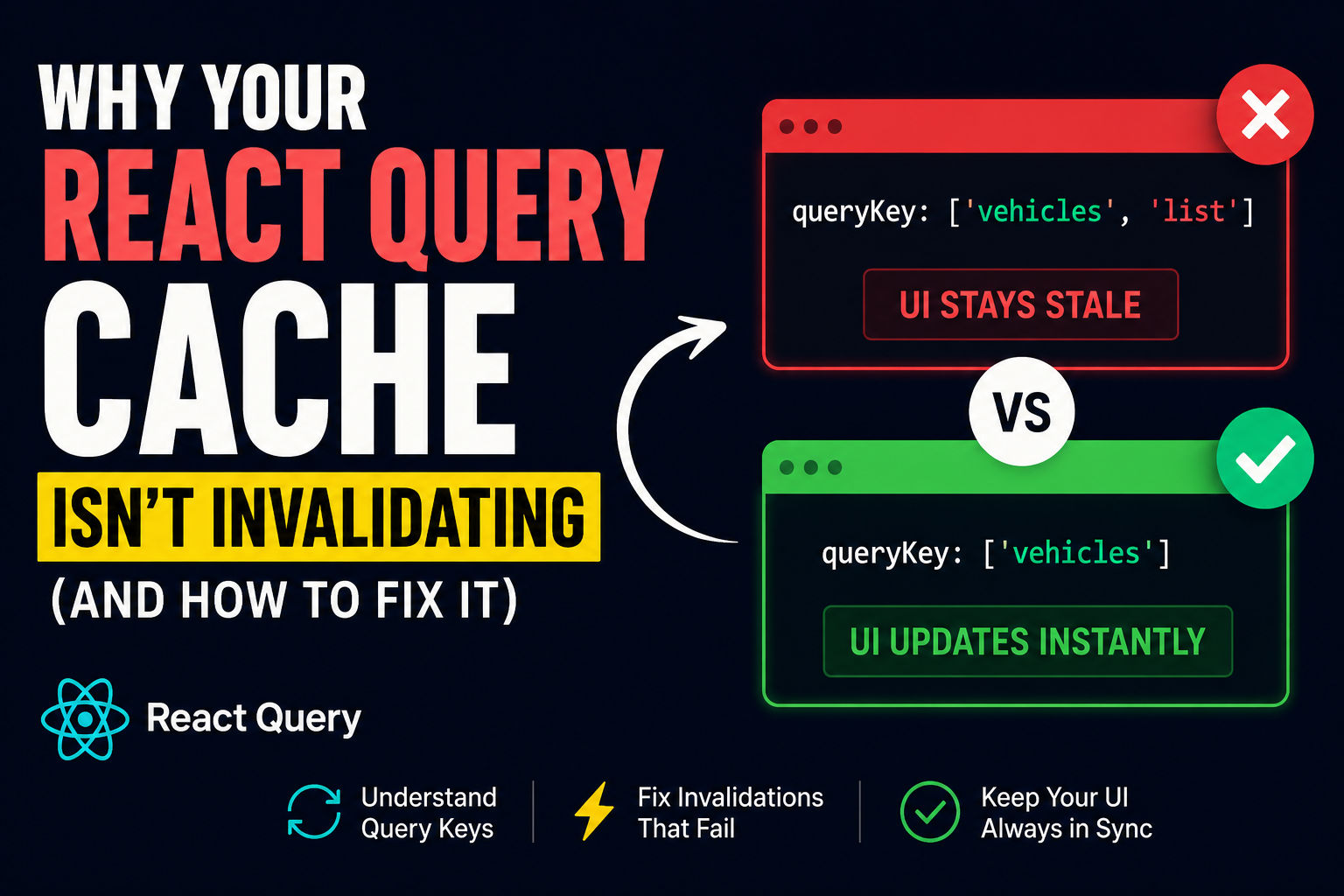
You've built a killer React app. Data fetches fine. But after you update something? The UI doesn't refresh. Your mutation works (the server confirmed it), but the UI is showing stale data like nothing happened. Sound familiar?
Here's the thing: React Query cache invalidation isn't broken—it's just picky about how you call it. Most of the time, cache invalidation fails because of a mismatch between how you define your query keys and how you're trying to invalidate them. There's a specific gotcha that trips up nearly every developer at some point. I'm going to show you exactly what it is and how to fix it.
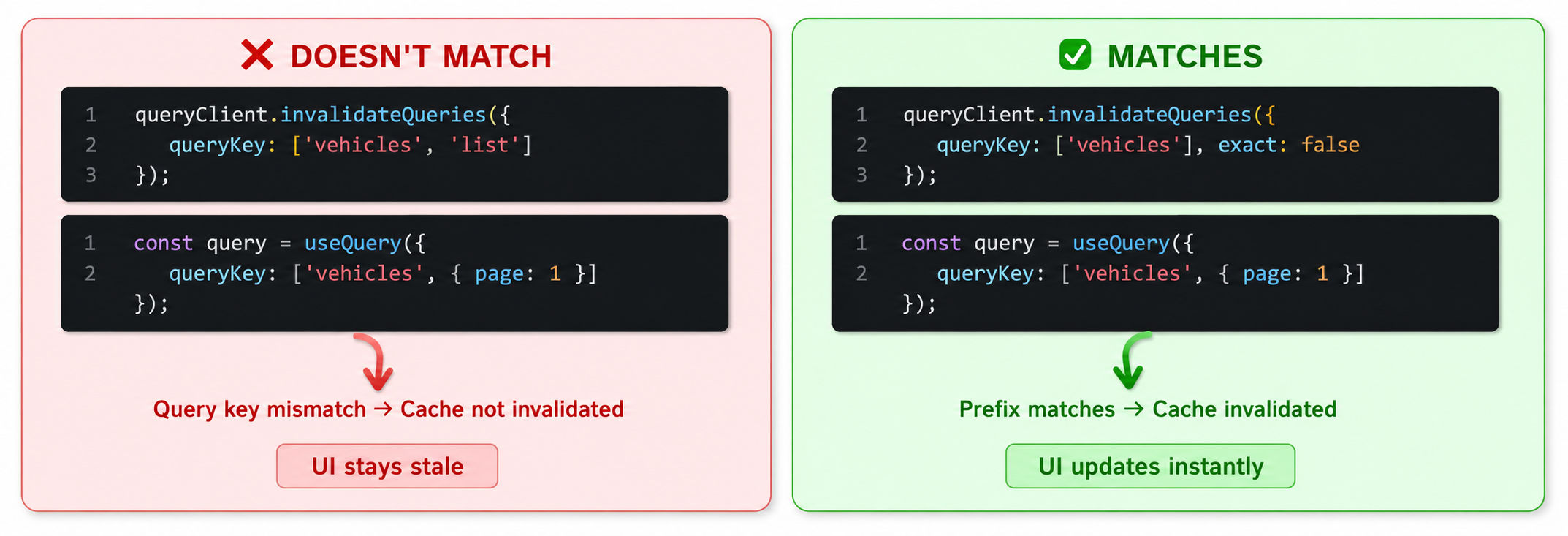
Let me walk you through the most common scenario. You've got a vehicle management app. A user updates a vehicle, and you want to refresh the list:
1const { mutate: updateVehicle } = useMutation({
2  mutationFn: ({ id, data }) => api.put(`/vehicles/${id}`, data),
3  onSuccess: () => {
4    // ❌ This doesn't work
5    queryClient.invalidateQueries({ queryKey: ['vehicles', 'list'] });
6  }
7});
The mutation executes. The server responds. The success callback fires. But the UI doesn't update.
Why? Because your query is defined with a different key structure. Maybe it's:
1const { data: vehicles } = useQuery({
2  queryKey: ['vehicles', { page: 1, sort: 'name' }],
3  queryFn: fetchVehicles
4});
You're trying to invalidate
['vehicles', 'list']
['vehicles', { page: 1, sort: 'name' }]The solution? Use
exact: false
1onSuccess: () => {
2  // ✅ This works
3  queryClient.invalidateQueries({
4    queryKey: ['vehicles', 'list'],
5    exact: false
6  });
7}
Or better yet, match the actual query key structure:
1onSuccess: () => {
2  queryClient.invalidateQueries({
3    queryKey: ['vehicles'] // This will match ALL vehicles queries
4  });
5}
[INSERT VISUAL: Code comparison - "❌ DOESN'T MATCH" vs "✅ MATCHES" showing different query key structures]
Understanding textexact: true
vs textexact: false
exact: true
exact: false
React Query gives you two modes for invalidation, and this is critical to understand.
exact: true
1queryClient.invalidateQueries({
2  queryKey: ['todos'],
3  exact: true
4});
5
6// ✅ This query WILL be invalidated
7const query1 = useQuery({
8  queryKey: ['todos'],
9  queryFn: fetchTodos
10});
11
12// ❌ This query WILL NOT be invalidated
13const query2 = useQuery({
14  queryKey: ['todos', { page: 1 }],
15  queryFn: fetchTodos
16});
The second query doesn't match exactly because it has extra parameters in the key.
exact: false
1queryClient.invalidateQueries({
2  queryKey: ['todos'],
3  exact: false  // or just omit this, exact: false is default
4});
5
6// ✅ This query WILL be invalidated
7const query1 = useQuery({
8  queryKey: ['todos'],
9  queryFn: fetchTodos
10});
11
12// ✅ THIS WILL ALSO BE INVALIDATED
13const query2 = useQuery({
14  queryKey: ['todos', { page: 1 }],
15  queryFn: fetchTodos
16});
17
18// ✅ THIS TOO
19const query3 = useQuery({
20  queryKey: ['todos', 23, 'details'],
21  queryFn: fetchTodoDetails
22});
Here's the practical rule: If you're invalidating after a mutation that affects multiple related queries, use exact: false
The Mutation + Invalidation Pattern
This is the bread-and-butter pattern for keeping your React Query cache in sync with the server. After a mutation succeeds, you tell React Query to mark certain queries as stale, which triggers automatic refetches.
1import { useMutation, useQueryClient } from '@tanstack/react-query';
2
3function CreateUserComponent() {
4  const queryClient = useQueryClient();
5
6  const mutation = useMutation({
7    mutationFn: async (newUser) => {
8      const res = await api.post('/users', newUser);
9      return res.data;
10    },
11    onSuccess: () => {
12      // When mutation succeeds, refetch the users list
13      queryClient.invalidateQueries({ queryKey: ['users'] });
14    }
15  });
16
17  const handleSubmit = () => {
18    mutation.mutate({ name: 'Alice', email: 'alice@example.com' });
19  };
20
21  return (
22    <div>
23      <button onClick={handleSubmit} disabled={mutation.isPending}>
24        {mutation.isPending ? 'Adding...' : 'Add User'}
25      </button>
26      {mutation.isError && <p>Error: {mutation.error.message}</p>}
27    </div>
28  );
29}
Here's what happens:
- User clicks the button, is calledtext
mutation.mutate()
- The POST request fires to text
/users
- Server responds successfully
- callback executestext
onSuccess
- marks all user queries as staletext
queryClient.invalidateQueries({ queryKey: ['users'] }) - Any component using will automatically refetch in the backgroundtext
useQuery({ queryKey: ['users'] }) - UI updates with fresh data
This is the power of React Query. You don't manually update state or manage loading spinners. The cache invalidation triggers the refetch, and React Query handles the rest.
[INSERT VISUAL: Timeline showing "User Clicks" → "Mutation Fires" → "Server Responds" → "onSuccess Fires" → "invalidateQueries Triggers" → "Automatic Refetch" → "UI Updates"]
Common Mistakes That Break Cache Invalidation
1. Typos in Query Keys
You define a query with
['todos']
['todos', 'list']
1// ❌ Query defined here
2const { data } = useQuery({
3  queryKey: ['todos'],
4  queryFn: fetchTodos
5});
6
7// ❌ Trying to invalidate with a different key
8onSuccess: () => {
9  queryClient.invalidateQueries({ queryKey: ['todos', 'list'] });
10}
Fix: Double-check your query key strings. Use constants to avoid typos:
1// queryKeys.ts
2export const queryKeys = {
3  todos: {
4    all: ['todos'],
5    list: ['todos', 'list'],
6    detail: (id) => ['todos', 'detail', id]
7  }
8};
9
10// In your components
11const { data } = useQuery({
12  queryKey: queryKeys.todos.all,
13  queryFn: fetchTodos
14});
15
16onSuccess: () => {
17  queryClient.invalidateQueries({ queryKey: queryKeys.todos.all });
18}
2. Forgetting the Difference Between textinvalidateQueries
and textrefetchQueries
invalidateQueries
refetchQueries
invalidateQueries
refetchQueries
1// Invalidates active queries only (default)
2queryClient.invalidateQueries({ queryKey: ['users'] });
3
4// Refetches all matching queries, active or not
5queryClient.refetchQueries({ queryKey: ['users'] });
Usually,
invalidateQueries
3. Not Accounting for Nested or Parameterized Query Keys
If your query has parameters (like pagination, filters, or IDs), your invalidation needs to account for that.
1// Query with parameters
2const { data } = useQuery({
3  queryKey: ['users', { page: 1, search: 'alice' }],
4  queryFn: () => fetchUsers({ page: 1, search: 'alice' })
5});
6
7// ❌ This won't match
8queryClient.invalidateQueries({ queryKey: ['users'] });
9
10// ✅ This will match (and any users query with those parameters)
11queryClient.invalidateQueries({
12  queryKey: ['users'],
13  exact: false
14});
15
16// ✅ Or be specific about which user query
17queryClient.invalidateQueries({
18  queryKey: ['users', { page: 1, search: 'alice' }],
19  exact: true
20});
4. Invalidating in textonError
Instead of textonSettled
onError
onSettled
If you want to invalidate regardless of whether the mutation succeeded or failed, use
onSettled
1// ❌ Only invalidates on success
2onSuccess: () => {
3  queryClient.invalidateQueries({ queryKey: ['items'] });
4}
5
6// ✅ Invalidates whether it succeeds or fails
7onSettled: () => {
8  queryClient.invalidateQueries({ queryKey: ['items'] });
9}
How to Debug Cache Invalidation Issues
If cache invalidation isn't working, here's how to diagnose it.
Step 1: Check Your Query Keys in the Browser
Use
queryClient.getQueryData()
1const queryClient = useQueryClient();
2
3// In the browser console, get all todos queries
4const todosData = queryClient.getQueryData(['todos']);
5console.log('Current todos in cache:', todosData);
6
7// Get state of all queries
8const queries = queryClient.getQueryCache().getAll();
9console.log('All queries:', queries.map(q => ({ key: q.queryKey, stale: q.isStale() })));
This shows you exactly what query keys React Query is tracking. If your mutation is trying to invalidate a key that doesn't exist, you'll spot it immediately.
Step 2: Add Console Logs to Your Invalidation
1onSuccess: () => {
2  console.log('Mutation succeeded, about to invalidate queries');
3  queryClient.invalidateQueries({ queryKey: ['items'] }).then(() => {
4    console.log('Invalidation complete');
5  });
6}
If you see "Mutation succeeded" but not "Invalidation complete," something's wrong. If you see both, but the UI doesn't update, the problem is likely that no component is using that query.
Step 3: Verify Components Are Actually Subscribed
Make sure you have a component somewhere that's actually calling
useQuery
1// This must exist somewhere for invalidation to trigger a refetch
2const { data: items } = useQuery({
3  queryKey: ['items'],
4  queryFn: fetchItems
5});
If no component is using the query, React Query won't refetch it (it'll just mark it as stale). This is by design—no need to fetch data nobody's looking at.
[INSERT VISUAL: Debugging flowchart - "Is query in cache?" → "Are components subscribed?" → "Is invalidation working?" with decision points]
Advanced: Predicate Functions for Granular Control
For complex applications with lots of queries, you can invalidate queries based on custom logic using a predicate function:
1queryClient.invalidateQueries({
2  predicate: (query) => {
3    // Only invalidate queries where the first key element is 'items'
4    // AND the query involves this specific user
5    return query.queryKey[0] === 'items' && query.queryKey[1] === userId;
6  }
7});
This gives you fine-grained control. You can invalidate "all post queries for this user" or "all queries containing the word 'invoice'" or any custom logic you need.
1// Invalidate all queries related to a specific resource
2queryClient.invalidateQueries({
3  predicate: (query) => {
4    return query.queryKey.some(key => key === 'user' || key === userId);
5  }
6});
The Optimistic Update + Invalidation Combo
For the smoothest UX, combine optimistic updates with invalidation. Show the user the change immediately, then sync with the server:
1const updateTodo = useMutation({
2  mutationFn: ({ id, completed }) =>
3    api.patch(`/todos/${id}`, { completed }),
4
5  onMutate: async ({ id, completed }) => {
6    // Cancel any in-flight queries
7    await queryClient.cancelQueries({ queryKey: ['todos'] });
8
9    // Snapshot old data
10    const previousTodos = queryClient.getQueryData(['todos']);
11
12    // Optimistically update cache
13    queryClient.setQueryData(['todos'], (old) =>
14      old.map(todo =>
15        todo.id === id ? { ...todo, completed } : todo
16      )
17    );
18
19    return { previousTodos };
20  },
21
22  onError: (err, variables, context) => {
23    // If mutation fails, rollback to previous data
24    queryClient.setQueryData(['todos'], context.previousTodos);
25  },
26
27  onSettled: () => {
28    // After success or error, refetch to ensure we're in sync
29    queryClient.invalidateQueries({ queryKey: ['todos'] });
30  }
31});
Here's the flow:
- User toggles a todo
- Before the request even sends, the UI updates instantly ()text
onMutate
- Request goes to server
- If it fails, we roll back the optimistic change ()text
onError
- After success or failure, we invalidate and refetch the actual server state ()text
onSettled
Users see instant feedback, and you're guaranteed to be in sync with the server.
Stale Time, Cache Time, and Invalidation
Two settings affect how invalidateQueries works:
staleTime
gcTime
cacheTime
When you call
invalidateQueries
1const { data: items } = useQuery({
2  queryKey: ['items'],
3  queryFn: fetchItems,
4  staleTime: 1000 * 60 * 5,  // Data fresh for 5 minutes
5  gcTime: 1000 * 60 * 10     // Keep in cache for 10 minutes
6});
7
8// Later, when you invalidate...
9queryClient.invalidateQueries({ queryKey: ['items'] });
10// ^ Ignores staleTime, marks as stale immediately, refetches if active
When to Use Each Invalidation Strategy
| Scenario | Use This |
|---|---|
| After creating a new item (POST) | Invalidate parent list query |
| After updating an item (PATCH) | Invalidate detail + list query |
| After deleting an item (DELETE) | Invalidate list + all affected queries |
| Server pushes real-time update (WebSocket) | Predicate function for surgical invalidation |
| User navigates between pages | text refetchOnMount: true |
| Complex state with many dependencies | Predicate function or custom invalidation service |
Putting It All Together
Here's a complete, production-ready example:
1// queryKeys.ts
2export const queryKeys = {
3  vehicles: {
4    all: ['vehicles'],
5    list: (filters) => ['vehicles', 'list', filters],
6    detail: (id) => ['vehicles', id]
7  }
8};
9
10// useVehicles.ts
11import { useQuery, useMutation, useQueryClient } from '@tanstack/react-query';
12import { queryKeys } from './queryKeys';
13
14export function useVehicles(filters) {
15  return useQuery({
16    queryKey: queryKeys.vehicles.list(filters),
17    queryFn: () => fetchVehicles(filters)
18  });
19}
20
21export function useVehicleDetail(id) {
22  return useQuery({
23    queryKey: queryKeys.vehicles.detail(id),
24    queryFn: () => fetchVehicle(id)
25  });
26}
27
28export function useUpdateVehicle() {
29  const queryClient = useQueryClient();
30
31  return useMutation({
32    mutationFn: ({ id, data }) => api.put(`/vehicles/${id}`, data),
33    onSuccess: (updatedVehicle) => {
34      // Update the detail query with the new data
35      queryClient.setQueryData(
36        queryKeys.vehicles.detail(updatedVehicle.id),
37        updatedVehicle
38      );
39
40      // Invalidate all vehicle lists (in case sorting/filtering changed)
41      queryClient.invalidateQueries({
42        queryKey: queryKeys.vehicles.list(),
43        exact: false
44      });
45    }
46  });
47}
48
49// In a component
50function VehicleEditor({ vehicleId }) {
51  const { data: vehicle } = useVehicleDetail(vehicleId);
52  const updateVehicle = useUpdateVehicle();
53
54  const handleSave = (updatedData) => {
55    updateVehicle.mutate({ id: vehicleId, data: updatedData });
56  };
57
58  return (
59    // UI here
60  );
61}
This pattern is scalable, maintainable, and covers all the common invalidation scenarios.
Bottom line: React Query cache invalidation seems like magic until you understand that it's just pattern matching between query keys. Define your queries with consistent key structures, invalidate with matching prefixes, and you'll never have stale data again. The
exact: false
Your users will thank you for the instant, reliable data updates.
Most People Asked
CS student and builder writing about tech, startups, AI, and productivity. Built a SaaS that didn't ship — walked away with real product experience instead. Sharing everything learned along the way.