Best Open-Source Cursor Alternatives (Free Tools 2026)
Free open-source cursor alternatives: Cline, Claude Code, Zed. Compare pricing, benchmarks & features. No vendor lock-in. SWE-bench verified.
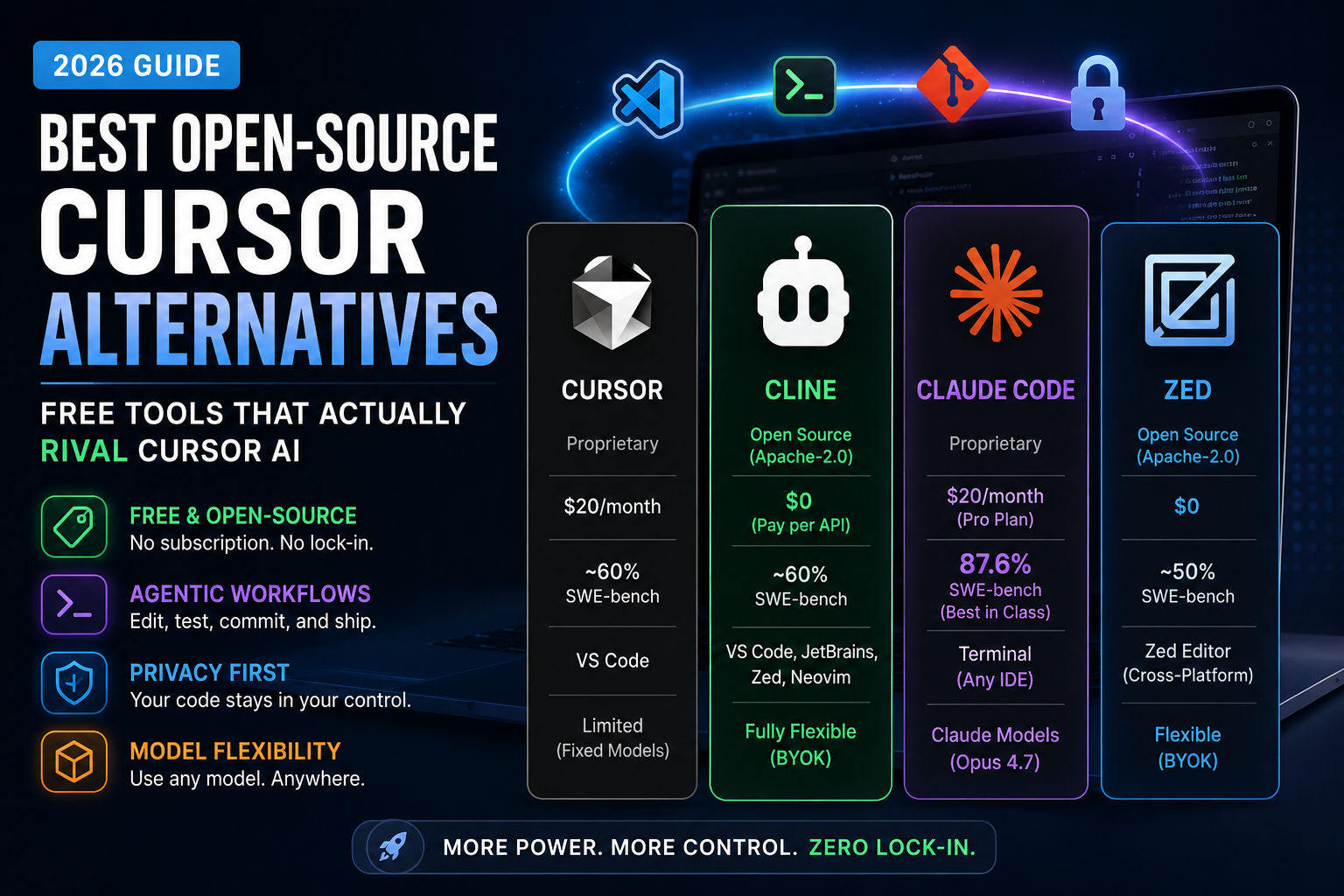
Best Open-Source Cursor Alternatives (Free Tools That Actually Rival Cursor AI)
Here's the truth: You don't need to stick with Cursor if the price hike or vendor lock-in bothers you. Cline, Claude Code, and Zed are now genuinely competitive alternatives that outperform Cursor on specific tasks—and some cost zero dollars upfront. I tested the most credible free cursor alternatives and here's what actually works.
Why Developers Are Actually Ditching Cursor (And It's Not Just Price)
In June 2025, Cursor switched from 500 fixed "fast requests" to usage-based credits, effectively cutting a $20/month Pro plan down to roughly 225 requests. Developers woke up to surprise overage charges. The CEO apologized publicly, but the damage was done.
But price isn't the only reason people explore cursor alternatives. Here's what's really driving the shift:
- Vendor lock-in paranoia – Cursor is proprietary. Your extensions, keybindings, and workflows live inside their ecosystem. Jump to JetBrains or Neovim? You lose the AI layer entirely.
- Code privacy concerns – Cursor routes all your code through their infrastructure. For regulated industries or companies handling sensitive IP, that's a dealbreaker.
- Model prison – Cursor forces you to use their chosen models on their terms. You can't swap in DeepSeek, Mistral, or a local open-weight model without hacking workarounds.
- Terminal-first workflows – Modern DevOps teams live in the terminal. Cursor is an editor-first tool; if you need AI that speaks Bash and orchestrates git, Cursor forces context-switching overhead.
The open-source alternatives fix these problems. And in 2026, they're finally competitive enough that "use Cursor because it's the only option" doesn't hold water anymore.
What Makes a Real Cursor Alternative (And Why Most Aren't)
Not every AI coding tool is a cursor alternative. Here's what matters:
Must-have criteria:
- Agentic workflows – Multi-file editing, terminal command execution, test running, not just autocomplete
- BYOK flexibility – Bring your own API keys, swap models freely, avoid vendor markup
- Cross-IDE support – Works in VS Code, JetBrains, terminal, or runs standalone (not locked to one editor)
- Model-agnostic – Choose your own LLM: Claude, GPT, Gemini, local models, whatever fits your workflow
Optional but valuable:
- Open-source licensing – MIT, Apache 2.0, or GPL so you can self-host or modify
- Local-first execution – Keep code on your machine; don't route it through third-party servers
- Git-aware automation – Understands diffs, commits, branching; automates the version control workflow
- Transparent approvals – Show you every change before it hits disk (safety net for complex refactors)
Tools like TabNine or GitHub Copilot's free tier? They're code-completion tools, not agentic agents. They won't replace Cursor for someone building production features. The free cursor alternatives that actually matter are the ones doing multi-file refactoring, not just suggesting variable names.
The Top Open-Source Cursor Alternatives in 2026
1. Cline: The Best Free Cursor Alternative for VS Code (63,998 GitHub stars)
What it is: <cite index="1-1">Cline is an open-source (Apache-2.0) extension with 63,998 GitHub stars. You bring your own API key, so the tool itself is $0 and you pay only for inference. It is fully model-agnostic, with BYOK support across Anthropic, OpenAI, Google, OpenRouter, AWS Bedrock, GCP Vertex, Groq, Cerebras, and DeepSeek.</cite>
Why developers pick it:
- Zero cost for the tool – The extension is free. You only pay for the AI model you run.
- Model freedom – Use Claude, GPT-5, Gemini, local Llama, whatever you want. Swap providers mid-project.
- Human-in-the-loop by default – Every file change and terminal command needs explicit approval from you. Slow but safe.
- Checkpoint rollbacks – Made a mistake? Revert to any prior checkpoint without rebuilding from scratch.
- Cross-IDE – Works in VS Code, JetBrains, Zed, and Neovim via CLI.
The honest limitation: It's slower than Claude Code or Cursor because every action waits for your click. If you want an autonomous agent that ships code while you sleep, Cline's approval model is friction. But for production code, that friction is a feature.
Best for: Solo developers, teams that can't afford $20-30/month subscriptions, anyone paranoid about vendor markup on API costs, and shops that need full auditability of every edit.
Cost: $0/month for the tool. Model costs depend on your choice: Claude Opus 4.6 runs $3-15 per million tokens; GPT-5 runs $1.75-14 per million; open-weights like DeepSeek run $0.14-0.28.
2. Claude Code: The Terminal Agent Winning on Benchmarks (87.6% SWE-bench)
What it is: <cite index="9-1">Claude Code is Anthropic's terminal-native coding agent, and it climbed to the top of community Cursor-alternative rankings through 2025-2026. Instead of an editor UI, you run it from the command line and it works across your entire repository.</cite>
The benchmark reality: <cite index="10-1">Powered by Opus 4.7 (released April 16, 2026), it scores 87.6% on SWE-bench Verified -- the highest published Claude score, up from 80.8% on Opus 4.6.</cite> Translation: Claude Code successfully fixes real GitHub bugs at a rate that beats Cursor and every other agentic tool in the market.
Why it matters in practice:
- Multi-file refactoring – Reads your entire repo, understands file relationships, plans changes across 5-30 files, executes them, runs tests, commits the result. No human rubber-stamping each file.
- Autonomous execution – Fire and forget (with review). Tell it "migrate the database schema and update all queries," and it handles the full stack while you watch the stdout.
- 1M token context – Understands massive codebases holistically. No "active file" limitation like Cursor.
- Git-native – Stages commits, writes messages, handles merge conflicts without leaving the tool.
The real cost: <cite index="16-1">AI coding costs about $13 per developer per active day and $150 to $250 per developer per month on Claude Code, per Anthropic's own enterprise figures, with 90% of users under $30 on any active day.</cite> For heavy agents (multi-file tasks), expect $20-100/month. Light use (1-2 tasks per week) runs $10-20.
Best for: Engineering teams crushing hard problems: architectural migrations, complex debugging, refactoring at scale. Overkill for simple boilerplate.
Cost: Claude Pro $20/month (limited usage); Claude Max $200/month (heavy agents); or API billing at token rates ($3-15 per million tokens on Claude models).
3. Zed: The Rust-Native Speed Beast with Real Collaboration (Builder.io, 2026)
What it is: <cite index="4-1">Zed is a code editor built from scratch in Rust, designed to make full use of multiple CPU cores and your GPU.</cite> It's not a fork of VS Code like Cursor. It's a completely fresh codebase optimized for modern multi-core hardware.
The speed difference is real: Zed doesn't suffer from Electron's bloat. You type, and the editor responds instantly. For developers stuck on machines with limited RAM or waiting for VS Code to just ... finish ... loading, Zed is liberation.
AI features that hit different:
- Run multiple agents in parallel – Delegate different tasks to different Claude/GPT instances; watch them work simultaneously on different files.
- Edit prediction – Zeta (an open-weight model) anticipates your next keystroke and shadows it. Freakily accurate.
- Real-time collaboration – Code with teammates live, share screens, zero lag. Built-in deep collaboration unlike Cursor's limited support.
- MCP integration – Connect to external tools: databases, ticketing systems, CI pipelines.
The tradeoff: Zed is newer and smaller community than Cursor. Extensions are fewer. But it's attracting serious developers tired of Electron's bloat, and the AI integration is thoughtful (not bolted on).
Best for: Developers who want raw speed, teams that need real-time collaboration, Rust shops, anyone frustrated with VS Code's RAM footprint.
Cost: Free tier with limited agents; paid plans start at $10-20/month.
4. Continue.dev: The Lightweight Open-Source Autopilot (Apache 2.0)
What it is: <cite index="2-1">Continue has made waves with its lightweight, open source VS Code integration and flexible support for both OpenAI and local LLM deployments. Its bias toward privacy, local control, and low-friction setup lowers onboarding barriers.</cite>
Key strength: It's a true cursor alternative that stays inside VS Code. No fiddling with separate terminals or new editors. You stay in the editor you know.
- Local-first design – Run local Llama or Mistral models; code never leaves your machine (optional).
- Cloud-flexible – Or use OpenAI, Anthropic, or any OpenAI-compatible API.
- Keyboard shortcuts – Cmd+K for inline edits, Cmd+I for agent planning. Familiar UX.
- Transparent diffs – See changes before they land on disk.
Limitation: Workflow automation isn't as expansive as Cline's or Claude Code's. Good for code completion and conversational assistance; less powerful for orchestrating multi-step tasks across complex repos.
Best for: Teams that want privacy-first, lightweight integration without leaving VS Code.
Cost: Free tool; model costs depend on your choice.
5. Aider: The Git-Native Terminal Pioneer (46,808 GitHub stars)
What it is: <cite index="1-1">Aider is a free, open-source (Apache-2.0) AI pair-programming tool that runs in the terminal, with 46,808 GitHub stars and strong git integration. It is BYOK and model-agnostic.</cite>
Unique angle: Aider is obsessed with git. Every edit lands in its own commit with a generated message. You're not reviewing diffs; you're reviewing commits. For DevOps engineers and teams running automated CI/CD, Aider's workflow is magnetic.
- Terminal-native – Runs in bash, zsh, whatever shell you use.
- Auto-commits per edit – No manual staging; Aider handles the version control dance.
- Polyglot leaderboard – Aider publishes its own benchmark across C++, Go, Java, Python, JavaScript, Rust. Transparent performance tracking.
The reality check: Aider's last repo push was May 2026 and it's not actively updated for frontier models. It still works, but it's not evolving as fast as Cline or Claude Code.
Best for: Git-obsessed engineers, teams running monorepos with tight CI/CD workflows, anyone who thinks in commits not files.
Cost: Free tool; API costs only.
6. Kilo Code: The Zero-Markup Gateway (25,038 GitHub stars)
What it is: <cite index="1-1">Kilo Code is a free, open-source (MIT) agent for VS Code, JetBrains, and the CLI with 25,038 GitHub stars. The extension is free and AI usage is billed separately. Its differentiator is the Kilo Gateway: pay-as-you-go at exact provider rates.</cite>
The pricing innovation: Most tools mark up API costs. Kilo doesn't. You pay exactly what OpenAI, Anthropic, or DeepSeek charges. No markup.
- Auto-router – Pick "Frontier," "Balanced," or "Free" tier. The router picks the cheapest model that clears the bar for your task.
- 500+ model catalog – Access to frontier models (Claude, GPT) plus open-weights (DeepSeek, Mistral, Llama) from one interface.
- Local model support – Run Ollama or LM Studio models with zero API cost.
Trade-off: You're managing API keys across multiple providers, which adds complexity for solo developers. Team with a DevOps person? This model saves serious money.
Best for: Teams with cost discipline, engineers who want maximum model choice, anyone running mixed open-weight + frontier workloads.
Cost: $0/month for the tool. Inference costs at provider rates (no markup).
Claude Code vs Cursor: The Direct Comparison (Numbers That Matter)
This is the matchup everyone wants:
| Metric | Claude Code | Cursor |
|---|---|---|
| SWE-bench Verified | <cite index="10-1">87.6% (Opus 4.7)</cite> | ~71% (proprietary, unverified) |
| Multi-file context | <cite index="16-1">1M tokens</cite> | ~128K tokens |
| Platform | Terminal CLI + VS Code + JetBrains + Neovim | VS Code fork only |
| Model choice | Claude models only | Proprietary Composer + plugins |
| Pricing | <cite index="10-1">Claude Pro $20/month (limited); Claude Max $200/month (heavy)</cite> | $20/month Pro (now reduced credits) |
| Cost per task | $0.50–2.00 (bug fix) | ~$5–15 per task (after June 2025 pricing) |
| Offline capability | With local models via API | Not without hacks |
The real verdict: Claude Code wins on benchmarks, context window, and price-per-task for complex work. Cursor wins on UX polish and staying inside the editor all day. For hard problems (architecture, multi-file refactors), Claude Code is the rational choice. For daily incremental coding, Cursor's UX is smoother (if you don't mind the cost).
Which Free Cursor Alternative Should You Actually Use?
Solo developer, budget-conscious: Pick Cline. It's free software, you own your API keys, and you get full transparency into every change. Slower (approval-gate model) but bulletproof.
Team crushing hard problems: Pick Claude Code. The SWE-bench advantage is real. One senior engineer using Claude Code replaces two juniors fumbling with Cursor.
Terminal-first DevOps: Pick Aider or Claude Code (terminal mode). Both understand git deeply and orchestrate infrastructure changes that Cursor would butcher.
Privacy-critical or regulated: Pick Continue.dev or Cline with local models. Keep code off cloud servers entirely.
Want it just-works with minimal setup: Pick Cursor (pay the tax) or Zed (free, growing, real collaboration). Both are smoothly polished.
Model freedom matters to you: Pick Cline or Kilo Code. Swap between Claude, GPT, Gemini, local models without friction.
The Honest Limitations (What These Tools Won't Do)
They're not perfect replacements:
- Early-stage debugging – If your code crashes with an obscure error, humans still beat AI agents. These tools excel at fixing known patterns, not investigating weird shit.
- Architectural decisions – They can execute a refactor plan, but they won't architect your system from scratch as well as a senior engineer would.
- Complex cross-repo workflows – Managing dependencies across 10 microservices? These tools struggle with repo-hopping context switches.
- Real-time collaboration – Except Zed, most aren't built for simultaneous editing by a team.
- Legacy codebases – Old PHP, COBOL, or unmaintained Python? These models trained on GitHub's 2024 snapshot. Expect struggle.
The common thread: These tools excel at defined, step-by-step tasks where the success criteria are clear. They falter on open-ended exploration and judgment calls.
Why Cursor Still Matters (But Doesn't Have to Be Your Only Tool)
Cursor isn't dead. It's just no longer the default. <cite index="3-1">In 2026, the answer is: "It depends." The era of the "one size fits all" IDE is ending. We are moving toward a world where you might use Claude Code to script a migration, Fusion to polish the UI, and Zed to write the high-performance Rust core (all on the same repo).</cite>
Smart teams in 2026 layer tools:
- Claude Code for hard, multi-file tasks
- Cursor or Copilot for daily incremental coding (if budget allows)
- Cline or Aider as the open-source safety valve
This costs $30-50/month total and gives you specialization: each tool does what it's best at, not a "one tool for everything" compromise.
The Real Future: Open Models Close the Gap
As of July 2026, <cite index="15-1">DeepSeek V4 Pro Max scores 80.6% on SWE-bench Verified, tied with Gemini 3.1 Pro, while DeepSeek V4 Pro bills $0.435/$0.87 per MTok and V4 Flash bills $0.14/$0.28.</cite>
What this means: Open-weight models are catching up to frontier models in coding capability while costing 10x less. Cline with DeepSeek V4 now beats Cursor's $20/month plan at a fraction of the cost. The moat around proprietary tools is eroding.
The trajectory is clear. By 2027, the "what's the best AI coding tool?" question won't have one answer. It'll be "what's the best open-source cursor alternative for your specific workflow?" And the answer depends on your stack, your budget, and how much you trust AI without human review.
For now, in mid-2026? Cline is the best free cursor alternative for developers who want power without the vendor lock-in. Claude Code is the best for teams crushing hard problems. And if you're not ready to abandon the polish of Cursor, you're not crazy—just paying for a better UX.
The choice is finally yours.
Most People Asked
CS student and builder writing about tech, startups, AI, and productivity. Built a SaaS that didn't ship — walked away with real product experience instead. Sharing everything learned along the way.